one file :
(Get-ChildItem $[filename.extension]).LastWriteTime = $(get-date "mm-dd-yyyy")
multiple file :
Get-ChildItem | Foreach { $_.LastWriteTime = $(get-date "mm-dd-yyyy") }
it works :)
Showing posts with label programming. Show all posts
Showing posts with label programming. Show all posts
July 12, 2011

June 23, 2011
remove/prevent html tag
for example we have txtbox1 (textbox control), so we can remove the html tag with :
System.Text.RegularExpressions.Regex.Replace(txtbox1.Text, "<[^>]*>", string.Empty);
System.Text.RegularExpressions.Regex.Replace(txtbox1.Text, "<[^>]*>", string.Empty);
December 31, 2010
Microsoft SQL Server, Error: 916
(Microsoft SQL Server, Error: 916)
http://blog.cpugeni.com/archive/2008/09/22/microsoft-sql-server-management-studio-2008-error-916.aspxI came across a problem when using Microsoft SQL Server Management Studio 2008 to connect and manage a database which is housed on my shared host’s SQL Server 2005, the problem was that I couldn’t actually access my database, as I clicked the “Database” node within “Object Explorer” I received the message:
The server principal “username” is not able to access the database “databasename” under the current security context. (Microsoft SQL Server, Error: 916)

Anyway, after an hour, I decided that I would try and access my database within Microsoft Visual Studio 2008, using the “Server Explorer”. I set myself up with a connection to the database server, and hooray, I could connect and access everything. That left me wondering why it wasn’t working in the Management Studio, so I spent some more time trawling the net for an answer (since I’m hardly a SQL Server guru!). I eventually found something to help me out…
When I clicked on the “Databases” node within SQL Server Management Studio, the software would (in the background) execute an T-SQL query to retrieve a list of databases along with additional information about those databases, one of those pieces of information is collation, which I didn’t have permission to do for every database, only my own.
Fix:
- In Object Explorer, click Databases
- Display “Object Explorer Details” (F7) or “View –> Object Explorer Details”
- Right click the column headers and deselect “collation”
- Refresh Databases, and hopefully bingo!
November 01, 2010
October 21, 2010
HTML Special Character / Symbols
| ||||||||||||||||||||||||
| ||||||||||||||||||||||||
| ||||||||||||||||||||||||
| ||||||||||||||||||||||||
| ||||||||||||||||||||||||
| ||||||||||||||||||||||||
| ||||||||||||||||||||||||
| ||||||||||||||||||||||||
| ||||||||||||||||||||||||
| ||||||||||||||||||||||||
| ||||||||||||||||||||||||
| ||||||||||||||||||||||||
| ||||||||||||||||||||||||
| ||||||||||||||||||||||||
July 22, 2010
left outer join more than 3 table
SELECT a.supply, a.state, b.cost
FROM (Table1 a LEFT OUTER JOIN Table2 b ON a.supply = b.supply AND a.state = b.state)
FROM (Table1 a LEFT OUTER JOIN Table2 b ON a.supply = b.supply AND a.state = b.state)
LEFT OUTER JOIN Table3 c ON a.supply = c.supply
GROUP BY a.supply, a.state, b.cost, c.number, c.number2
GROUP BY a.supply, a.state, b.cost, c.number, c.number2
July 01, 2010
how to retrieve checkboxlist selected value
*use the following code --
*cbl is the instance of checkboxlist
for (int i = 0; i < cbl.Items.Count; i++)
{
if (cbl.Items[i].Selected)
{ // bla bla bla .. }
else { }
}
June 04, 2010
jika aplikasi ASP.NET anda suka loading lama g karuan ..
Kemungkinan besar dari masalah autentikasi ..
Check this out,
http://support.microsoft.com/kb/312629/EN-US/
Check this out,
http://support.microsoft.com/kb/312629/EN-US/
March 19, 2010
SQL Server Date Format
| DATE FORMATS | ||
| Format # | Query (current date: 12/30/2006) | Sample |
| 1 | select convert(varchar, getdate(), 1) | 12/30/06 |
| 2 | select convert(varchar, getdate(), 2) | 06.12.30 |
| 3 | select convert(varchar, getdate(), 3) | 30/12/06 |
| 4 | select convert(varchar, getdate(), 4) | 30.12.06 |
| 5 | select convert(varchar, getdate(), 5) | 30-12-06 |
| 6 | select convert(varchar, getdate(), 6) | 30 Dec 06 |
| 7 | select convert(varchar, getdate(), 7) | Dec 30, 06 |
| 10 | select convert(varchar, getdate(), 10) | 12-30-06 |
| 11 | select convert(varchar, getdate(), 11) | 06/12/30 |
| 101 | select convert(varchar, getdate(), 101) | 12/30/2006 |
| 102 | select convert(varchar, getdate(), 102) | 2006.12.30 |
| 103 | select convert(varchar, getdate(), 103) | 30/12/2006 |
| 104 | select convert(varchar, getdate(), 104) | 30.12.2006 |
| 105 | select convert(varchar, getdate(), 105) | 30-12-2006 |
| 106 | select convert(varchar, getdate(), 106) | 30 Dec 2006 |
| 107 | select convert(varchar, getdate(), 107) | Dec 30, 2006 |
| 110 | select convert(varchar, getdate(), 110) | 12-30-2006 |
| 111 | select convert(varchar, getdate(), 111) | 2006/12/30 |
| TIME FORMATS | ||
| 8 or 108 | select convert(varchar, getdate(), 8) | 00:38:54 |
| 9 or 109 | select convert(varchar, getdate(), 9) | Dec 30 2006 12:38:54:840AM |
| 14 or 114 | select convert(varchar, getdate(), 14) | 00:38:54:840 |
http://www.mssqltips.com/tip.asp?tip=1145
February 22, 2010
menambahkan auto reload data pada amCharts (file settings.xml)
<'settings>
<'data_type>csv<'/data_type>
<'reload_data_interval>1<'/reload_data_interval>
<'add_time_stamp>true<'/add_time_stamp>
<'digits_after_decimal>2<'/digits_after_decimal>
<'plot_area>
<'border_alpha>100<'/border_alpha>
<'border_color>DAF0FD<'/border_color>
<'margins>
<'top>10<'/top>
<'bottom>30<'/bottom>
<'left>5<'/left>
<'right>3<'/right>
<'/margins>
<'/plot_area>
<'grid> ...
<'data_type>csv<'/data_type>
<'reload_data_interval>1<'/reload_data_interval>
<'add_time_stamp>true<'/add_time_stamp>
<'digits_after_decimal>2<'/digits_after_decimal>
<'plot_area>
<'border_alpha>100<'/border_alpha>
<'border_color>DAF0FD<'/border_color>
<'margins>
<'top>10<'/top>
<'bottom>30<'/bottom>
<'left>5<'/left>
<'right>3<'/right>
<'/margins>
<'/plot_area>
<'grid> ...
January 28, 2010
Get Auto ID from SQL Server after insert something
use this,
select scope_identity()
after you execute the insert query ..
November 05, 2009
SQL Server PL SQL to manipulate text
source : http://www.mssqltips.com
The following is a list of SQL Server 2000 T-SQL commands that exist to allow you to manipulate text data either from stored procedures, triggers, functions or embedded SQL code.
In addition to using the commands by themselves you can use multiple commands at the same time to provide more meaningful results.
Next Steps
The following is a list of SQL Server 2000 T-SQL commands that exist to allow you to manipulate text data either from stored procedures, triggers, functions or embedded SQL code.
| Command | Description |
| CHARINDEX( findTextData, textData, [startingPosition] ) | Returns the starting position of the specified expression in a character string. The starting position is optional. |
| LEFT( character_expression , integer_expression ) | Returns the left part of a character string with the specified number of characters. |
| LEN( textData ) | Returns integer value of the length of the string, excluding trailing blanks |
| LOWER ( character_expression ) | Returns a character expression after converting uppercase character data to lowercase |
| LTRIM( textData) | Removes leading blanks |
| PATINDEX( findTextData, textData ) | Returns integer value of the starting position of text found in the string |
| REPLACE( textData, findTextData, replaceWithTextData ) | Replaces occurrences of text found in the string with a new value |
| REPLICATE( character_expression , integer_expression ) | Repeats a character expression for a specified number of times. |
| REVERSE( character_expression ) | Returns the reverse of a character expression. |
| RTRIM( textData) | Removes trailing blanks |
| SPACE( numberOfSpaces ) | Repeats space value specified number of times |
| STUFF( textData, start , length , insertTextData ) | Deletes a specified length of characters and inserts another set of characters at a specified starting point |
| SUBSTRING( textData, startPosition, length ) | Returns portion of the string |
| UPPER( character_expression ) | Returns a character expression with lowercase character data converted to uppercase. |
Examples
The examples below are just simple SELECT statements using hard coded values. You can use these functions when querying your tables, so you can manipulate the string values as you query your data and return the modified result.
| Query | Value |
| SELECT CHARINDEX('SQL', 'Microsoft SQL Server - SQL Server') | 11 (SQL is found in the 11 position) |
| SELECT CHARINDEX('SQL', 'Microsoft SQL Server - SQL Server', 20) | 24 (SQL is found in the 24 position, since we started looking in position 20) |
| SELECT LEFT('Microsoft SQL Server - SQL Server' , 20 ) | Microsoft SQL Server (left 20 characters of the string) |
| SELECT LEN('Microsoft SQL Server - SQL Server') | 33 (total length of the string) |
| SELECT LOWER('Microsoft SQL Server - SQL Server') | microsoft sql server - sql server (string in lower case) |
| SELECT LTRIM( ' Microsoft SQL Server - SQL Server ') | Microsoft SQL Server - SQL Server (trimmed string removing leading spaces) |
| SELECT PATINDEX( '%SQL%', 'Microsoft SQL Server - SQL Server' ) | 11 (SQL is found in the 11 position) |
| SELECT REPLACE( 'Microsoft SQL Server - SQL Server', 'Server', 'Server 2005' ) | Microsoft SQL Server 2005 - SQL Server 2005 (string after we replace 'Server' with 'Server 2005') |
| SELECT REPLICATE( 'x' , 10 ) | xxxxxxxxxx (x replicated 10 times) |
| SELECT REVERSE( 'Microsoft SQL Server' ) | revreS LQS tfosorciM (string in reverse) |
| SELECT RTRIM( ' Microsoft SQL Server - SQL Server ') | Microsoft SQL Server - SQL Server (string after removing trailing spaces) |
| SELECT 'Microsoft' + SPACE(10) + 'SQL Server' | Microsoft SQL Server (string after inserting 10 spaces) |
| SELECT STUFF( 'Microsoft SQL Server', 11 , 3 , '2005' ) | Microsoft 2005 Server (string after replacing positions 11, 12, 13 with '2005') |
| SELECT SUBSTRING( 'Microsoft SQL Server', 1, 9 ) | Microsoft (substring of statement starting at position 1 for 9 characters) |
| SELECT UPPER('Microsoft SQL Server - SQL Server') | MICROSOFT SQL SERVER - SQL SERVER (string in upper case) |
| Query | Value |
| SELECT LEFT('Microsoft SQL Server', CHARINDEX(' ', 'Microsoft SQL Server - SQL Server',13) - 1) | Microsoft SQL (find portion of string where a space is found but starting at position 13) |
| SELECT LEFT('Microsoft SQL Server', CHARINDEX(' ', 'Microsoft SQL Server - SQL Server') - 1) | Microsoft (find portion of string where a space is found) |
| SELECT LTRIM(RTRIM(' Microsoft SQL Server - SQL Server ')) | Microsoft SQL Server - SQL Server (trim leading and trailing spaces) |
Next Steps
- Get familiar with these commands and how they can be used to manipulate text data
- Look for ways of using multiple commands together to reach the desired results
November 03, 2009
Mengatasi Masalah Connection Pool
pesan error :
Timeout expired. The timeout period elapsed prior to obtaining a connection from the pool. This may have occurred because all pooled connections were in use and max pool size was reached.
Coba lihat di database IDE Management ..
klik kanan nama database kemudian cari menu detach ...
dan cari koneksi2 yang mencurigakan dan layak di'bunuh' :)
Good Luck
October 27, 2009
September 25, 2009
generate cs file from wsdl

Open Visual Studio Command prompt
 Windows -> start -> Microsoft Visual Studio 2008 -> Visual Studio Tools
type " wsdl [options] {URL | path} "
read the details on http://msdn.microsoft.com/en-us/library/7h3ystb6(VS.80).aspx
September 16, 2009
Error: 9002 SQL Server
Error: 9002, Severity: 17, State: 2
The transaction log for database '%.*ls' is full. To find out why space in the log cannot be reused, see the log_reuse_wait_desc column in sys.databases
Nah kalo udah nemu error database (SQL Server khususnya) kayak di atas ..
Causes :
The transaction log for database '%.*ls' is full. To find out why space in the log cannot be reused, see the log_reuse_wait_desc column in sys.databases
Nah kalo udah nemu error database (SQL Server khususnya) kayak di atas ..
Causes :
- A very large transaction log file.
- Transactions may fail and may start to roll back.
- Transactions may take a long time to complete.
- Uncommitted transactions
- Extremely large transactions
- Operations: DBCC DBREINDEX and CREATE INDEX
- While restoring from transaction log backups
- Client applications do not process all results
- Queries time out before a transaction log completes the expansion and you receive false 'Log full' error messages
- Unreplicated transactions
- check db integrity
- shrink db
- re-organize index
- update statistics
- backup db
- maintenance cleanup
August 25, 2009
Difference between Web.Config and Machine.Config File
Difference between Web.Config and Machine.Config File
Two types of configuration files supported by ASP.Net.Configuration files are used to control and manage the behavior of a web application.
i) Machine.config
ii)Web.config
Difference between Machine.Config and Web.Config
Machine.Config:
i) This is automatically installed when you install Visual Studio. Net.
ii) This is also called machine level configuration file.
iii)Only one machine.config file exists on a server.
iv) This file is at the highest level in the configuration hierarchy.
Web.Config:
i) This is automatically created when you create an ASP.Net web application project.
ii) This is also called application level configuration file.
iii)This file inherits setting from the machine.config
XML Editor Tool
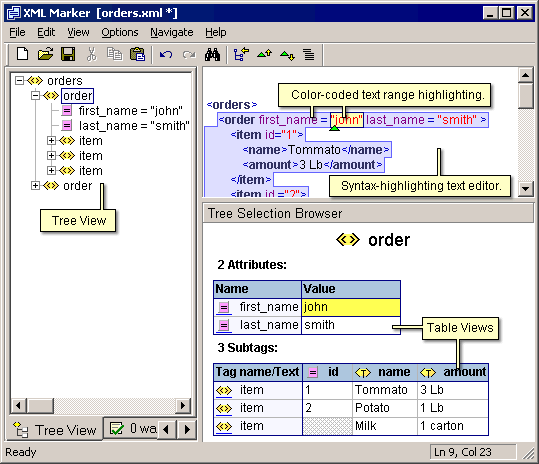
 Tools dari symbol click ini ternyata powerful banget selain free tentunya ..
silahkan dicoba aja, buat yang butuh XML editor yang mantab .. :)
March 18, 2009
sedikit celah ngutak ngatik scrollbar html - css
hm.. g menyangka nantinya aq harus memikirkan interface buat ngakalin scrollbar di page html, haha ..
masalahnya cuman supaya tampilannya jadi maknyos aja .. jadi page html dengan tampilan yg compact dan g melebar ke mana-mana .. tapi tetep dengan isi yang dinamis (alias tabel yg dapat melebar kesana kemari :p) ..
ya paling gampang pake CSS aja de ..
ambil property overflow dan beberapa manipulasi tampilan scrollbar ..
kutambahin script css :
#scrolling_class
{
width:840px; /*ku clip aja dgn tinggi dan lebar segini*/
height:250px;
overflow: auto; /*otomatis keluar jika isi melebii clip*/
margin : 0 auto; /*biar tampilan pas di tengah*/
}
kemudian kurangkai imajinasiku untuk menghasilkan komposisi tampilan scrollbar :
body {
/*scrollbar property*/
scrollbar-face-color: #FFFAF0;
scrollbar-shadow-color: #FFFFFF;
scrollbar-highlight-color: #FFFFFF;
scrollbar-3dlight-color:#53670D;
scrollbar-darkshadow-color: #53670D;
scrollbar-track-color: #D4E597;
scrollbar-arrow-color: #494D4C;
}
*skrinsut menyusul :))
masalahnya cuman supaya tampilannya jadi maknyos aja .. jadi page html dengan tampilan yg compact dan g melebar ke mana-mana .. tapi tetep dengan isi yang dinamis (alias tabel yg dapat melebar kesana kemari :p) ..
ya paling gampang pake CSS aja de ..
ambil property overflow dan beberapa manipulasi tampilan scrollbar ..
kutambahin script css :
#scrolling_class
{
width:840px; /*ku clip aja dgn tinggi dan lebar segini*/
height:250px;
overflow: auto; /*otomatis keluar jika isi melebii clip*/
margin : 0 auto; /*biar tampilan pas di tengah*/
}
kemudian kurangkai imajinasiku untuk menghasilkan komposisi tampilan scrollbar :
body {
/*scrollbar property*/
scrollbar-face-color: #FFFAF0;
scrollbar-shadow-color: #FFFFFF;
scrollbar-highlight-color: #FFFFFF;
scrollbar-3dlight-color:#53670D;
scrollbar-darkshadow-color: #53670D;
scrollbar-track-color: #D4E597;
scrollbar-arrow-color: #494D4C;
}
*skrinsut menyusul :))
March 12, 2009
regular expression asp.net g jalan di kompi/server lain ..
Hari ini udah hari yang ke-2 dipusingin masalah script
di ASP.Net yang g mau jalan di server publish ..
Padahal di localhost bisa dan secara logika harusnya ni bisa ..
karena (qrasa dan udah qperiksa berkali2) g ada yang salah ama Regular Expression nya ..
ni kukutip sebagian scriptnya :
ErrorMessage="Just excel (xls,xlsx) document allowed!"
ValidationExpression="^(([a-zA-Z]:)|(\\{2}\w+)\$?)(\\(\w[\w].*))(.xls|.XLS|.xlsx|.XLSX)$"
ControlToValidate="browse" Display="Dynamic" EnableClientScript="true">
dan bener ternyata, setelah aku baca2 di forum orang-orang pinter kalo ternyata jika kita pake versi .net
dan framework yang berbeda maka maka nama system web folder nya juga beda,
ini mungkin yang bikin aplikasiq salah alamat.
Jadi waktu aku bikin di localhost, folder system web nya ada di
C:\Inetpub\wwwroot\aspnet_client\system_web\1_0_3705_6060
hm, karena aku g tau nama system web folder di server yang kumaksud,
jadi aku copy aja file javascript yang q butuhin bersama file-file web aspx yang udah ku publish.
jadi di file .aspx nya tinggal nambahin aja referensi ke file javascript tadi.
huee bener .. akhirnya action validate dari regular expression tadi berhasil !!
ALHAMDULILAH .. hahaha
di ASP.Net yang g mau jalan di server publish ..
Padahal di localhost bisa dan secara logika harusnya ni bisa ..
karena (qrasa dan udah qperiksa berkali2) g ada yang salah ama Regular Expression nya ..
ni kukutip sebagian scriptnya :
ErrorMessage="Just excel (xls,xlsx) document allowed!"
ValidationExpression="^(([a-zA-Z]:)|(\\{2}\w+)\$?)(\\(\w[\w].*))(.xls|.XLS|.xlsx|.XLSX)$"
ControlToValidate="browse" Display="Dynamic" EnableClientScript="true">
dan bener ternyata, setelah aku baca2 di forum orang-orang pinter kalo ternyata jika kita pake versi .net
dan framework yang berbeda maka maka nama system web folder nya juga beda,
ini mungkin yang bikin aplikasiq salah alamat.
Jadi waktu aku bikin di localhost, folder system web nya ada di
C:\Inetpub\wwwroot\aspnet_client\system_web\1_0_3705_6060
hm, karena aku g tau nama system web folder di server yang kumaksud,
jadi aku copy aja file javascript yang q butuhin bersama file-file web aspx yang udah ku publish.
jadi di file .aspx nya tinggal nambahin aja referensi ke file javascript tadi.
huee bener .. akhirnya action validate dari regular expression tadi berhasil !!
ALHAMDULILAH .. hahaha
Subscribe to:
Posts (Atom)