Showing posts with label windows. Show all posts

May 01, 2011

Enable Remote Desktop Save Credentials

As default Windows OS does not allowed the users to save credentials when he/she connect to a remote computer.
maybe you'll see this notification : 
"your system administrator does not allow the use of saved credentials to log on to the remote computer"

You should change this settings, with do this steps :

  1. Click the Start button Picture of the Start button, type gpedit.msc, and then press ENTER.‌ Administrator permission required If you are prompted for an administrator password or confirmation, type the password or provide confirmation.
  2. Under Computer Configuration, double-click Administrative Templates, double-click System, and then double-click Credentials Delegation.
  3. In the right pane, double-click Allow Saved Credentials with NTLM-only Server Authentication.
  4. In the dialog box that appears, click Enabled, and then click Show.
  5. In the Show Contents dialog box, click Add, type the name of the remote computer (server) in this format: TERMSRV\, and then clickOK.

hope it works 
http://windows.microsoft.com/en-US/windows-vista/Troubleshoot-Remote-Desktop-problems

March 24, 2011

project cannot save this project until all required fields have valid values [Microsoft Project 2007]

Did you see the notification above when you save your project to the Project server ? .
So you can do this step :
1. Check the required fields that you have to fill. (Project/Project Information)
    you can see the required fields noted with the asterisk symbol.
2. If you have fill all of the required fields, so we could assume that something wrong even bug with the Microsoft project Client. You can see the hotfix on microsoft support
  

June 04, 2010

jika aplikasi ASP.NET anda suka loading lama g karuan ..

Kemungkinan besar dari masalah autentikasi ..
Check this out,
http://support.microsoft.com/kb/312629/EN-US/

April 12, 2010

computer shortcut

Driving around your desktop

To...Use this shortcut
Select a file/folder/iconType the first letter of the file. If you have several files starting with the same letter, continue hitting the letter key until your cursor lands on the file or folder you want.
Search for a file/folderF3
Rename a file/folderSelect the file/folder, click F2, and then re-type the name
Find out when the file or folder was created, by whom, and how big it isSelect the file, right-click, and then click Properties
Display the Start menuCtrl + Esc
Create a shortcut on your desktop to your favorite file/folderDrag the file/folder icon to your desktop
Scroll between open itemsAlt + Tab, then hold down Alt while clicking Tab to reach the desired file or program

Working with Word

To...Use this shortcut
Select textShift + Right Arrow, Left Arrow, Up Arrow, or Down Arrow to highlight text
Copy selected textCtrl + C
Cut selected textCtrl + X
Paste selected textCtrl + V
Undo your last actionCtrl + Z
Select all the text within your documentCtrl + A
Bold textCtrl + B
Italicize textCtrl + I
UnderlineCtrl + U
Decrease font sizeCtrl + Shift + <
Increase font sizeCtrl + Shift + >
Change fontCtrl + Shift + F, then use the arrow keys to reach the new font
Change font sizeCtrl + Shift + P, then use the arrow keys to reach the new font size
Create page breakCtrl + Enter
Create new documentCtrl + N
Open My Documents windowCtrl + O
Close a documentCtrl + W
Save a documentCtrl + S
Print a documentCtrl + P
Preview what you're about to printAlt + Ctrl + I

Accelerating Excel

To...Use this shortcut
Move right to left, cell by cellTab
Move up and down, cell by cellEnter
Erase data in current cellBackspace
Return to the beginning of the rowHome
Enter the dateCtrl + ; (semicolon)
Enter the timeCtrl + Shift + : (colon)
Start a formula= (equal sign)
Check the spelling of titles or words within the cellsF7
Find out about the style within the cellALT + ' (apostrophe)
Display the Format Cells dialog boxCtrl + 1
Apply the general number formatCtrl + Shift + ~
Turn numbers into dollarsCtrl + Shift + $
Make numbers a percentageCtrl + Shift + %
Apply a borderCtrl + Shift + &

Expediting Internet Explorer

To...Use this shortcut
Add sites to your Favorites
  • Go to the site.
  • Hit Ctrl + D to add to your Favorites.
  • Select Favorites and then Add to Favorites to create a separate folder for the site or to add it to a list already formed.
Select a home page
  • Go to the Web page that you would like to make your home page.
  • Open the Tools menu and select Internet Options.
  • Under Home page, click Use Current.
Use the History function if you visit a few select sites constantly
  • Select the History button on your top navigation (a green arrow on a clock face).
  • Select the site that you would like and double-click.
  • If the History button is not visible, go to the View menu, select Explorer Bar, and then click History to access.
Customize your toolbar to the tools you use most frequently
  • Right-click your top navigation.
  • Select the icons that you use or go to the View menu, select Toolbars, and then click Customize.
http://www.microsoft.com/athome/organization/compshortcuts.aspx

October 26, 2009

reset winsock

Command Prompt

netsh - winsock reset

September 25, 2009

generate cs file from wsdl


Open Visual Studio Command prompt
Windows -> start -> Microsoft Visual Studio 2008 -> Visual Studio Tools
type " wsdl [options] {URL | path} "

read the details on http://msdn.microsoft.com/en-us/library/7h3ystb6(VS.80).aspx

September 17, 2009

6 Langkah Bersihkan Virus Deadlock secara Manual


1. Disable [System Restore] selama proses pembersihan. Masuk menu Start>>Control Panel>>System>>System Restore>>Pilih turn off
2. Matikan proses virus yang aktif di memori, gunakan tools pengganti Task Manager, seperti Process Explorer, kemudian matikan proses yang mempunyai nama mysql.exe dan apache.exe

Silahkan download tools tersebut di url berikut:
http://technet.microsoft.com/en-us/sysinternals/bb896653.aspx

3. Agar virus ini tidak dapat aktif kembali sebaiknya blok file tersebut agar tidak dapat di eksekusi dengan mendaftarkan pada Software Restriction Policies. Fitur ini hanya ada pada komputer dengan sistem operasi Windows XP Professional/Windows Server 2003/Windows Vista dan Windows Server 2008, dengan cara:

- Klik menu [Start]
- Klik menu [Run]
- Pada kotak dialog RUN, ketik perintah SECPOL.MSC kemudian klik tombol [OK]
- Setelah muncul layar Local Security Settings, klik kanan pada menu Software Restriction Policies lalu klik Create New Policies
- Pada menu Software Restriction Policies, klik Additional Rules
- Klik kanan pada Additional Rules, kemudian pilih New Hash Rule..., kemudian akan muncul layar New Hash Rule
- Pada kolom File hash klik tombol Browse kemudian arahkan ke direktori [C:-Windows-system32-apache.exe]
- Kemudian klik tombol [Open]
- Pada kolom Security level pilih [Disallowed]
- Pada kolom description boleh di isi atau dikosongkan saja
- Klik tombol [Apply]
- Klik tombol [Ok]

Catatan:
Jika komputer Anda tidak terinstall Windows XP Professional/2003 Server/Vista/2008 lewati langkah ini.

4. Hapus string registry yang sudah diubah oleh virus. Untuk mempercepat proses perbaikan salin script di bawah ini pada program notepad kemudian simpan dengan nama repair.inf kemudian jalankan file tersebut dengan cara
- Klik kanan file repair.inf
- Klik [Install]

[Version]
Signature="$Chicago$"
Provider=Vaksincom

[DefaultInstall]
AddReg=UnhookRegKey
DelReg=del

[UnhookRegKey]
HKLM, Software-CLASSES-batfile-shell-open-command,,,"""%1"" %*"
HKLM, Software-CLASSES-comfile-shell-open-command,,,"""%1"" %*"
HKLM, Software-CLASSES-exefile-shell-open-command,,,"""%1"" %*"
HKLM, Software-CLASSES-piffile-shell-open-command,,,"""%1"" %*"
HKLM, Software-CLASSES-regfile-shell-open-command,,,"regedit.exe "%1""
HKLM, Software-CLASSES-scrfile-shell-open-command,,,"""%1"" %*"
HKLM, SOFTWARE-Microsoft-Windows NT-CurrentVersion-Winlogon, Shell,0, "Explorer.exe"
HKLM, SYSTEM-ControlSet001-Control-SafeBoot, AlternateShell,0, "cmd.exe"
HKLM, SYSTEM-ControlSet002-Control-SafeBoot, AlternateShell,0, "cmd.exe"
HKLM, SYSTEM-CurrentControlSet-Control-SafeBoot, AlternateShell,0, "cmd.exe"
HKCU, Software-Microsoft-Windows-CurrentVersion-Policies-Explorer, NoDriveTypeAutoRun,0x000000ff,255
HKLM, SOFTWARE-Microsoft-Windows-CurrentVersion-policies-Explorer, NoDriveTypeAutoRun,0x000000ff,255


[del]
HKCU, Software-Microsoft-Windows-CurrentVersion-Run, apache
HKLM, Software-Microsoft-Windows-CurrentVersion-Run, mysql


5. Hapus file induk virus yang ada di direktori

- C:-Windows-system32-apache.exe
- C:-Windows-system32-mysql.exe

6. Untuk pembersihan optimal dan mencegah infeksi ulang, install dan scan dengan menggunakan antivirus yang up-to-date.

Anda juga dapat menggunakan Norman Malware Cleaner, silahkan download tools tersebut di alamat berikut http://www.norman.com/support/support_tools/58732/en-us

*Catatan:
Jika komputer yang terinfeksi Deadlock ini tidak dapat melakukan booting Windows dengan muncul pesan error NTLDR Is Missing sebaiknya lakukan install ulang, sedangkan untuk data yang telah dihapus silahkan Anda recovery dengan menggunakan software recovery seperti GetData Back/Easy Recovery/Recovery my Files, tetapi hal ini tidak akan menjamin semua data akan dapat diselamatkan.

September 16, 2009

Error: 9002 SQL Server

Error: 9002, Severity: 17, State: 2
The transaction log for database '%.*ls' is full. To find out why space in the log cannot be reused, see the log_reuse_wait_desc column in sys.databases

Nah kalo udah nemu error database (SQL Server khususnya) kayak di atas ..
Causes :
How to maintenance or even solve it :
  • check db integrity
  • shrink db
  • re-organize index
  • update statistics
  • backup db
  • maintenance cleanup
and for additional run the dbcc shrinkdatabase("dbname", TRUNCATEONLY)

August 25, 2009

Difference between Web.Config and Machine.Config File

Difference between Web.Config and Machine.Config File

Two types of configuration files supported by ASP.Net.
Configuration files are used to control and manage the behavior of a web application.

i) Machine.config
ii)Web.config

Difference between Machine.Config and Web.Config
Machine.Config:
i) This is automatically installed when you install Visual Studio. Net.
ii) This is also called machine level configuration file.
iii)Only one machine.config file exists on a server.
iv) This file is at the highest level in the configuration hierarchy.

Web.Config:
i) This is automatically created when you create an ASP.Net web application project.
ii) This is also called application level configuration file.
iii)This file inherits setting from the machine.config

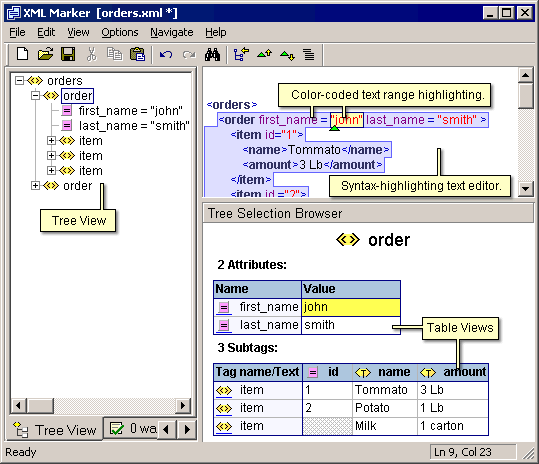
XML Editor Tool


Tools dari symbol click ini ternyata powerful banget selain free tentunya ..
silahkan dicoba aja, buat yang butuh XML editor yang mantab .. :)

March 14, 2008

reset password admin Windows XP

Berikut adalah salah satu cara untuk reset password admin Windows XP tanpa menggunakan tools/software khusus

(CD Windows XP Bootable needed )

1. Masukkan CD Windows XP(Bootable) ke dalam CD-Rom dan Kemudian nyalakan komputer
2. Saat ada peringatan “Press any key to boot from cd” ketik sembarang tombol pada keyboard.
3. Kemudian screen berwarna biru akan mengindikasikan 'Setup is inspecting your system and loading files'. tunggu sebentar
4. Ketika masuk pada Welcome Screen, tekan Enter (press ENTER to Setup Windows now)
5. Kemudian muncul layar 'Licensing Agreement' tekan F8 (Press F8 to accept it)
6. Kemudian pada opsi berikutnya pilih opsi Repair
7. Biarkan proses repair berjalan sampai selesai
8. Setelah itu komputer akan otomatis reboot (“Your computer will reboot in 15 seconds”)
9. Jangan klik apa2 dulu ,, perhatikan hingga ada tulisan "Installing Devices progress bar", di bagian pojok bawah kiri . Langsung tekan SHIFT + F10
10. Di prompt ketik NUSRMGR.CPL dan tekan Enter ,
11. Akan terlihat Interface/ tampilan User Accounts
12. Tinggal remove password administrator , ato bila perlu ganti passwordnya ,, :p